Followers

NOTICE:

Now you can click on photo and it will zoom in. Thanks to the HighSlide Javascript. How to do it? its in my "Blog Stuff" page...
Showing posts with label Software. Show all posts

Saturday, October 23, 2010

Berapa laju blog korang? jom test

Blog aku loading ok tak bagi korang?
Laju?
SLow? 
image lambat load?

Aku getting very curios tentang kelajuan blog aku load,
sebab aku rasa macam slow jer dengan semua widget yg ada kat tepi tu,
so aku pun carik la tools yang boleh test..

Aku rasa kalau blog tu slow loading, visitor pun akan lari tetambah pulak bila connection  pulak tak membantu dan teramat teruk/slow

Apa lagi guna Mr Google la... so aku dapat satu tools or website yang bagi service nih...


Aku pun masukkan la aku punya blog tu,
dapat result yang aku rasa boleh tahan la..
tak le great tapi ok la..

Friday, October 22, 2010

Windows Live Writer Review (Part 2)

This is a continuation from Part 1 a few days ago

Click HERE to read part 1.
Continue on from where we left off.

 wlwinterface2

4. Labels/Categories – at first i’m a bit lost when trying to put Label in my entry since i cannot find it in WLW. Apparently in WLW they put it as Categories. So this is where you can Label you post.

Wednesday, October 20, 2010

Windows Live Writer Review (Part 1)

English Mode: ON
(This review is a follow up on my earlier entry Blog Update Guna Windows Live Writer)

I think i’m not the only one who wish for a better offline editor. After i read an entry in a fellow blogger blog (Dahlia Journal (www.cikgudahliacom)) regarding Windows Live Writer (WLW).
I know i need to test it out and make a short review of it.

If you look at the WLW site, you immediately notice that by default the version shown is for Vista/Windows 7.
After a bit of searching i found the Windows XP version since i exclusively use Windows XP.
You ca`n download the Windows XP version  (HERE for Windows XP Version)
wlwFront

This review is based on what i see from WLW and by no means that this is a complete review. Just my personal opinion on what i can see also note that this ENTRY is written solely using the Windows Live Writer (WLW). How else to really experience the editor other than to use it… right?

Monday, October 18, 2010

Blog Update Guna Windows Live Viewer

Aku tengah test update blog guna Windows Live Writer as suggested by kak DJ (Dahlia Journal)- http://www.cikgudahlia.com/
Tengah testing, kalau ok maybe aku akan guna terus untuk gantikan Blogspot editor tu
Mari kita cuba.
WLW

Saturday, October 16, 2010

Medal of Honor (game baru yang aku MESTI main)

Aku sekarang memang dah jarang main game, tapi bila ada game yang memang genre aku, aku tetap akan main tak kira la apa orang kata.

Nak buat mcm mana kan dah hobby main game so bila ada game baru keluar kena la main.

Dulu aku nih suka main strategy game, tapi sejak kerja nih malas nka pikir banyak bila main game so now aku switch ke FPS (First Person Shooter) game pulak.

Game Medal Of Honor nih baru jer release 2-3 hari lepas (Oktober 12, 2010) so nanti sampai la kat sini.
Nanti bila sampai bleh la aku main, tangan aku pun dah gian lama tak tekan button A,S,W,D and click Left Mouse dah nih... last game best aku main ni game Bad Company 2.

Wednesday, August 04, 2010

Safari for Windows

Testing the new web-browser.
The "Visually-Pleasing" Safari

English Mode: ON

Last couple of nights, i have the urge to try a new web-browser.
I tried Google Chrome and loving it, now i need to try something else namely Safari.
I still haven't tested all the features yet, but i can feel that the speed is almost the same as using Chrome and Mozilla. plus the interface is very refreshing.

I especially loved the Top-Sites feature that will be loaded when you start Safari and this is very refreshing to have all the sites that you frequently visit to show in front of you; of course you need to add your frequently visit sites to the TOP-Sites for it to show there.
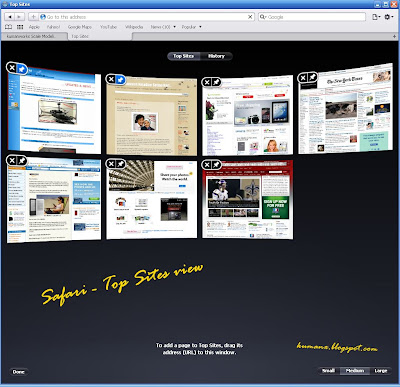
Oh the top sites show the view of the pages not just some link (like some of the browser i tested before). This is a very visually pleasing for the eyes.


The same goes for the History page, every page is shown as an image capture of your visited site, very nice.
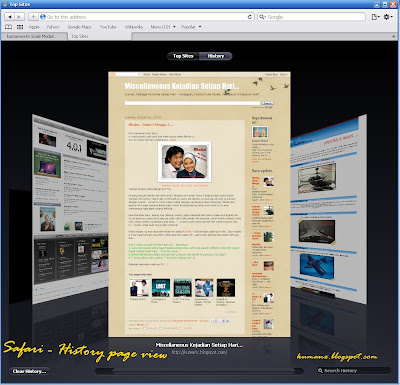

So far i'm loving it because it offers something new and visually pleasing (some people might find it a bit slow due to the loading of the image of the pages you use).

I'll give this a a try and maybe this will be my favorite to replace Mozilla that I'm currently using.

Now go and give Safari a try by downloading it here.

Now that i've used Safari, its time for me to change the look of my Windows XP/Windows 7 to match the whole Apple OS look that is the story for another entry..

adios..

Friday, July 30, 2010

website updated dengan PORTA

phew!!!

Selepas agak lama tak update apa-apa kat website Scale Modelling aku tu, akhirnya sempat jugak aku update dengan entry terbaru untuk helikopter OH-58D Kiowa Warrior. Sama macam yg pernah aku tunjuk kat blog ni dulu (Klik saya!!)
Satu kelainan unutk update kat website kali ni ialah aku try guna web album yg aku baru jumpa nama dia PORTA. Memang best guna Porta nih untuk buat album, cepat and customizable gak ler. Background bleh tukar, text kat bawah gambar bleh edit sesuka hati dan banyak lagi le.. aku pun tak abis lagi explore... Untuk sample PORTA nih, klik sini.

Nampaknya aku dah jumpa la yg menarik yg bleh aku gunakan,
sebelum nih aku guna Web Album Generator, ok jugak tapi aku rasa dia sedikit limited kot sebab background dia semua default tu putih (or aku yg tak tau pakai ehhehe).

Sample untuk Web Album Generator (WAG) nih ada gak kat website aku... klik sini aku pakai waktu aku buat page untuk Curtis SC-1 Seahawk, ada kat ruang Gallery tu..

Kalau nak compare dedua bleh la ikut link tu... ni sekali lagi link untuk sample tu..
1. Page yg guna PORTA - Click Me!
2. Page yg guna Web Album Generator - Click Me!

Jangan lupa tengok la page yg lain sama.

Next update insyallah kita tengok progress untuk Blackhawk helikopter pulak...
Related Posts with Thumbnails